The transcript colleges ask for, made at your kitchen table.
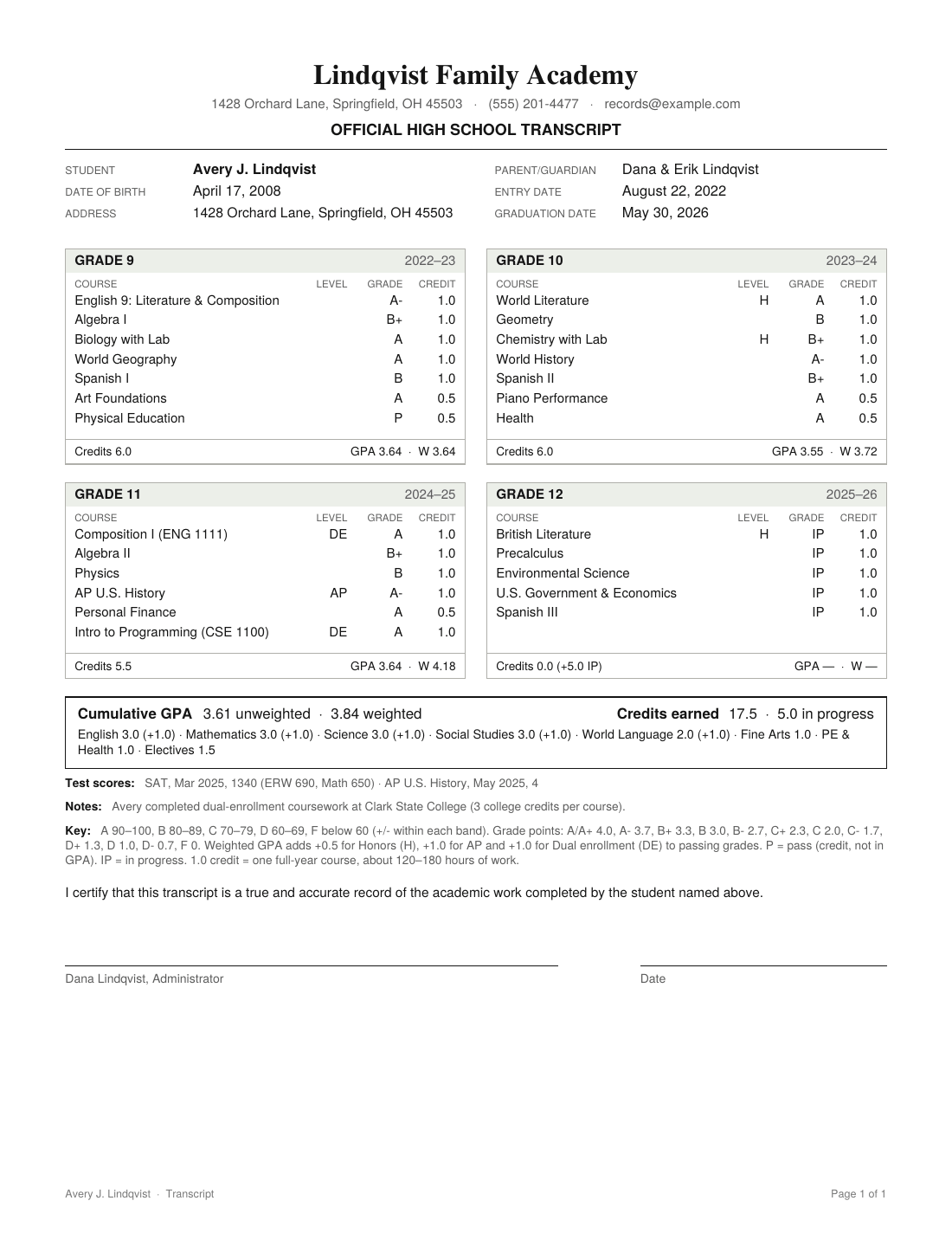
List the courses your student took. Kitchen Table Transcript works out credits and GPA, flags gaps in college-prep requirements, and gives you a signed-and-ready PDF in the format admissions offices expect.
No account. Your records stay in your browser and are never uploaded.
An afternoon, not a weekend
If you kept a list of what your student studied each year, you already have everything you need.
Add courses by year
Type the course name, subject, level and grade. Letter grades, percentages, Pass and In Progress all work.
Check the numbers
Credits and GPA update as you type. A credit check shows where your student stands against a typical college-prep plan.
Download and sign
Get a one-page PDF with a grading key and a signature line for you as the school administrator. Print it or upload it to the Common App.
Built around how admissions offices read transcripts
Weighted and unweighted GPA
Both appear on the transcript, with the bonus for Honors, AP and dual enrollment spelled out in the key. You set the bonus amounts.
Dual enrollment and AP
Mark community college and AP courses, and name the provider. They show up clearly so readers can see the rigor.
Courses in progress
Applying in senior fall? Mark current courses IP. They're listed with their credits but kept out of the GPA.
College-prep credit check
See English, math, science, social studies, world language, arts and PE credits next to a common four-year plan.
Course descriptions
Many selective colleges ask for them. Write a short description for each course and export them as a separate PDF.
Private by design
No sign-up and no server storing your child's grades. Download a backup file whenever you like.
Free for one student. One payment for the family.
No subscription. Pro is a single purchase that covers every child you homeschool, through graduation.
Free
- One student
- Weighted and unweighted GPA
- Transcript PDF
- College-prep credit check
- Backup and restore
Pro
- Everything in Free
- Unlimited students
- Course descriptions PDF
- No "Prepared with" line on your PDFs
- Use it in up to 3 browsers
30-day money-back guarantee. Secure checkout by Stripe.
Common questions from parents
Will colleges accept a transcript I make myself?
In the US, the parent is normally the administrator of a homeschool, and colleges routinely accept transcripts issued and signed by parents. Requirements vary, so check each college's homeschool admission page. Some also ask for course descriptions, test scores or a counselor letter.
Where are my child's records stored?
Only in the browser you use. Nothing you type is sent to us. That also means clearing your browser data erases them, so use the Backup tab to save a copy after each grading period.
How do I count credits?
A common rule is 1 credit for a full-year course of about 120 to 180 hours, and 0.5 for a semester course. Our transcript guide walks through credits, grades and GPA with examples.
Should I report weighted or unweighted GPA?
Both. Many colleges recalculate GPA their own way, and showing both with a clear key lets them do that quickly.
Can I change the transcript later?
Yes. Update grades each semester and download a fresh PDF any time. Your entries are saved automatically.
Start with what you already know
Open the tool with an example student loaded, then clear it and enter your own.